
Free for Mac
Simple Audio
Make any music track fit your edit.
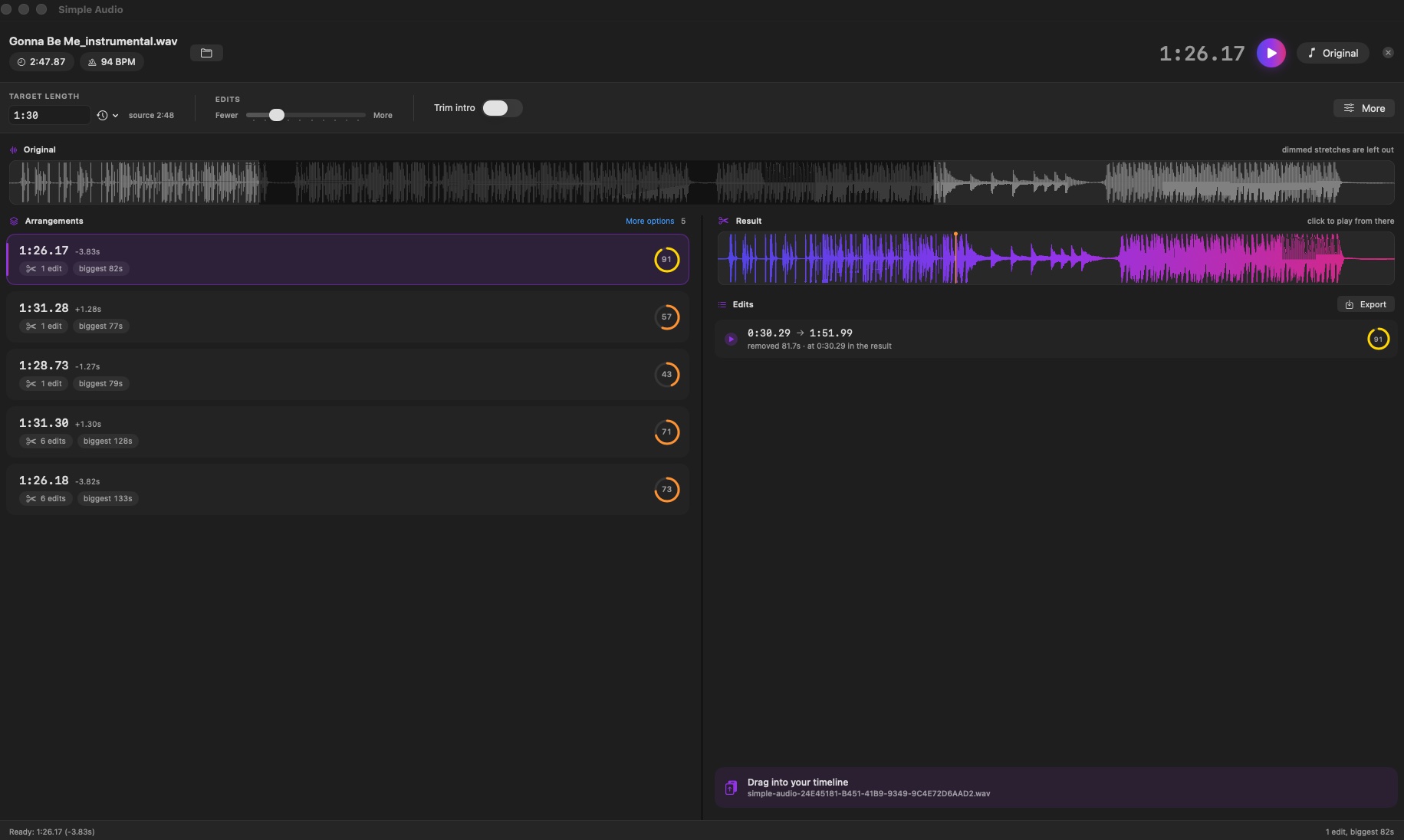
Type a length. Get that length of a song — musically re-edited on bar lines, not faded out or time-stretched. Standalone, so the output drops into Final Cut, Resolve, Premiere or Logic alike.
Finishing Apple's notarisation. The download link goes live shortly — the guide is ready now.

How it works
Five steps, one file out.
- Drop a track.MP3, M4A, AIFF, CAF or WAV. The header shows the song's length and detected tempo.
-
Type the length you need.Seconds (
90), MM:SS (1:30), or timecode pasted off a timeline (00:04:25:00). - Pick an arrangement.Several candidates appear on the left, best first — each with the length it produces, how many edits, and a quality ring.
- Listen to the joins.Press the play button beside any edit to hear two seconds either side of it. That is the fastest way to judge a result.
- Take the result.Drag the strip at the bottom right straight into your timeline, or export a 24-bit WAV.
What makes it different
The feature isn't new. Adobe ships it in Audition and Premiere. Two things differentiate this one.
Final Cut Pro has no equivalent. Premiere users get Remix bundled. Final Cut users have nothing built in. That's the gap.
It shows its working. Adobe gives you one answer. Simple Audio offers several ranked arrangements, each with a quality score, and lets you audition every join before accepting it. You hear why one option is better rather than trusting a black box.
Not a fade-out. Not a global time-stretch. Both are the failure modes this tool exists to replace. Cuts land on bar lines, phrases stay intact, and the intro and ending are protected by default. Under More, an "Exact length" toggle applies a tiny pitch-preserving stretch to land on the exact second when that matters more than fidelity.
The controls
Deliberately few. Everything else lives behind "More…".
- Edits
- Fewer to more. Left gives a small number of large cuts. Right tightens across the whole track with more, smaller edits. Middle is a sensible default.
- Trim intro
- Starts the result after the intro rather than at the beginning. Long instrumental build-ups need this.
- Exact length
- Applies a tiny pitch-preserving stretch to land on the exact second. Off by default — leave it that way when fidelity matters more than hitting the number.
- Tolerance
- How far from the target a result may land before it's rejected.
- Keep intro / ending uncut
- Protects the first and last stretch from being edited, so the song opens and closes the way it was written.
When it doesn't work
Honest limits, because the tool won't fit everything.
"Weak beat" shows on your track
Everything downstream rests on the bar grid. If the pulse wasn't found — sparse acoustic, rubato, free-time material — expect the cuts to be unconvincing.
The joins are audible
Some songs simply have no two points that splice cleanly. Try a different arrangement from the list, or move the Edits slider — fewer, larger cuts need fewer joins to go right.
It removed a section you wanted
Pick a different arrangement. That's what the list is for — the top one is a suggestion, not a verdict.
The length is a few seconds out
Cuts land on bar lines, so achievable lengths are discrete. Widen the tolerance, or switch on "Exact length".